Graph marker MARKER command
Commands in this namespace document graph markers.
MARKER is used below as a placeholder for:
GRAPHINST marker
Markers are graph annotations. They are independent of graph elements and do not contribute to the calculation of axis limits.
Rbc provides seven marker types:
Type |
Description |
|---|---|
|
Displays a Tk bitmap |
|
Displays a Tk image |
|
Displays one or more connected line segments |
|
Displays an ellipse, open arc, chord or sector |
|
Displays a filled and/or outlined polygon |
|
Displays text |
|
Displays an embedded Tk window |
A marker is created by specifying its type:
graph .g
.g marker create text -name label -coords {1.0 2.0} -text "Operating point"
.g marker create line -name limit -coords {0 5 10 5} -outline red
Unlike elements and pens, the marker name is not a positional argument of MARKER create. Use -name to
select an explicit name. If -name is omitted, Rbc generates a marker name.
Cairo rendering provides next features:
Line markers, arrowheads, and polygon/arc fills/outlines use
-antialias.Solid and stippled fills, colored dash gaps, caps, clipping, and
-underordering are supported.Mapped outline segments of line/polygon markers remain independent, as in native drawing; arcs use continuous paths.
XOR markers remain native.
Photo image markers use Cairo alpha compositing with existing placement and scaling. They clip to the plot;
-antialiasdoes not resample their pixels. Source image changes refresh the marker.Bitmap markers use Cairo with existing scaling, rotation, and masks. Their mapped pixels stay sharp;
-antialiasaffects rotated background polygons. An empty foreground uses Cairo with the native GC color.Text-marker backgrounds use Cairo, including rotated edges, and clip to the plot. Text itself stays native.
Window and non-photo image markers keep their Tk rendering; line markers with an empty
-outlineuse Cairo with the native GC color.
Marker coordinates
Marker coordinates are graph coordinates and are mapped through the axes selected by -mapx and -mapy.
The number of coordinates depends on the marker type:
Marker type |
Coordinates |
|---|---|
|
One or two X-Y pairs |
|
One or two X-Y pairs |
|
Two or more X-Y pairs |
|
Two opposite corners of an ellipse bounding box |
|
Three or more X-Y pairs |
|
One X-Y pair |
|
One X-Y pair |
For bitmap and image markers, one X-Y pair specifies the marker position. Two pairs specify opposite corners of a bounding rectangle. Bitmap markers are scaled to that rectangle. Photo images are likewise scaled to the rectangle; other Tk image types are drawn at their natural size.
Coordinate values may be Tcl numeric expressions. Inf, +Inf, and -Inf select elastic axis bounds.
An empty -coords value leaves the marker without drawable coordinates.
For example:
.g marker create text -coords {-Inf Inf} -anchor nw -text "upper left"
Drawing order
Markers have their own display order. MARKER before and MARKER after change the position of a marker in
that order.
By default markers are drawn over graph elements. The -under option changes whether an individual marker is
drawn below or above the element layer.
.g marker configure region -under yes
The marker ordering operations affect ordering between markers; they do not replace the -under setting.
Element association
-element associates a marker with an element:
.g marker create text -name note -element signal -coords {2 5} -text signal
The marker is displayed only while the associated element is displayed. An empty -element value removes the
association.
Marker bindings
Markers participate in graph component bindings. Bindings are made with MARKER bind.
Every marker has its marker name as an implicit binding tag. Additional tags are selected with -bindtags.
The default binding tags depend on the marker type:
Type |
Default |
|---|---|
|
|
|
|
|
|
|
|
|
|
|
|
|
|
For example:
.g marker create text -name note -coords {1 2} -text "click me" -bindtags {annotation all}
.g marker bind annotation <Button-1> {
    puts "annotation selected"
}
Marker types and options
All marker types share the coordinate, visibility, axis-mapping, naming, binding, state, drawing-order, and offset options described below. Each concrete marker type then adds its own drawing options.
MARKER cget and MARKER configure operate on the option table of the concrete marker being addressed. An
option valid for one marker type is not necessarily valid for another.
Common marker options
Option |
Database name |
Database class |
Description |
|---|---|---|---|
|
|
|
Specifies additional binding tags associated with the marker. The marker name is always an implicit binding tag. The default class tag depends on the marker type. |
|
|
|
Specifies the graph coordinates of the marker. The required number of coordinates depends on the marker type. The default is empty. Each coordinate accepts a Tcl numeric expression; Inf, +Inf and -Inf select elastic bounds. |
|
|
|
Associates the marker with an element. The marker is displayed only while that element is displayed. An empty value removes the association. |
|
|
|
Specifies whether the marker is hidden. The default is |
|
|
|
Specifies the X axis used to map marker coordinates. The axis must exist and must be an X axis. The default is |
|
|
|
Specifies the Y axis used to map marker coordinates. The axis must exist and must be a Y axis. The default is |
|
|
|
Assigns a marker to a ::rbc::TRACKGRAPH track. The |
|
— |
— |
Specifies the marker name. During creation, an omitted name is generated automatically. Reconfiguring |
|
|
|
Specifies the marker state: |
|
|
|
Specifies whether the marker is drawn below graph elements rather than above them. The default is |
|
|
|
Adds a horizontal screen-coordinate offset after the marker has been mapped. The default is |
|
|
|
Adds a vertical screen-coordinate offset after the marker has been mapped. The default is |
Markers in stacked tracks
In a ::rbc::TRACKGRAPH widget, -track name assigns a marker to one track. Supply -mapy with an axis owned by that
track; -mapx selects a shared horizontal axis as usual. The default empty -track retains a graph-wide
marker and requires a Y axis not owned by a track, such as the built-in y axis.
# A threshold in one row, extending across its shared X range.
.g marker create line -name threshold -track voltage -mapy voltageY  -coords {-Inf 0.5 Inf 0.5} -outline red -dashes {4 4}
# A time interval behind the current trace; +/-Inf follows this row's Y bounds.
.g marker create polygon -name interval -track current -mapy currentY  -coords {2 -Inf 3 -Inf 3 Inf 2 Inf} -fill lightyellow -outline {} -under yes
.g marker create text -name note -track voltage -mapy voltageY  -coords {2 0.5} -text Threshold -anchor sw
Painted track markers support line, polygon, arc, text, image and bitmap types. Drawing is clipped to the
track’s plotting rectangle, including text/image overhangs, thick strokes and arrowheads, with native and Cairo
rendering and SVG, PDF and PostScript output. Resizing, axis changes and export recalculate their mapping.
Bindings and overlapping-region searches do not select clipped portions outside the row. As for ordinary
markers, find enclosed tests the complete marker geometry rather than only its visible fragment.
Change -track and -mapy together to move a marker between rows. Remove or move its markers before deleting
a track or detaching their Y axis. Hidden markers and markers with no coordinates still hold this
association. An axis referenced by a graph-wide marker cannot be assigned to a track until those markers are
removed or remapped to another unowned axis. -element controls visibility independently; it does not select a
track. Marker stacking order and -under keep their existing meanings, including when graph-wide and track
markers are mixed.
Window markers accept -track and use the same overlap visibility as ordinary graphs. They are real child
widgets: a partially overlapping window is displayed at its full size and can extend into a gap, another track,
or the graph margins. Only the graph widget’s outer boundary clips the live child. No clipping containers are
introduced.
Line, polygon and arc track markers accept -xor yes. Their native XOR operation is applied within the clipped
redraw pass, also when the graph renderer is Cairo. Unlike graph-wide immediate XOR, track updates are
displayed on the next redraw (use update idletasks if immediate display is needed). Moving, hiding,
deleting, resizing or reordering tracks therefore does not rely on erasing old geometry against a changed
clipping region. Exports retain ordinary marker colours rather than XOR compositing.
Bitmap marker options
Bitmap markers display a Tk bitmap.
.g marker create bitmap -name bitmap1 -coords {0.5 0.5} -bitmap @demos/bitmaps/hobbes.xbm
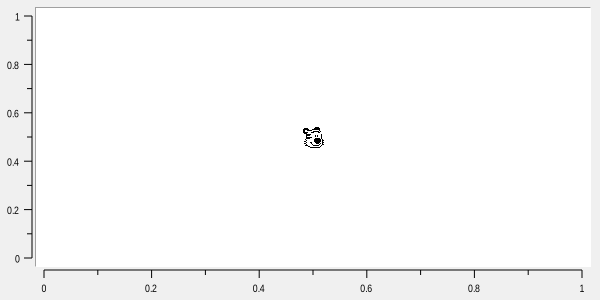
Mask could be provided alonhside of bitmap to indicate the part of the bitmap that should be transparent:
.g marker create polygon -name poly1 -coords {0.4 0.4 0.4 0.6 0.6 0.6 0.6 0.4}
.g marker create bitmap -name bitmap1 -coords {0.45 0.5} -bitmap @demos/bitmaps/hobbes.xbm
.g marker create bitmap -name bitmap2 -coords {0.55 0.5} -bitmap @demos/bitmaps/hobbes.xbm -mask @demos/bitmaps/hobbes_mask.xbm
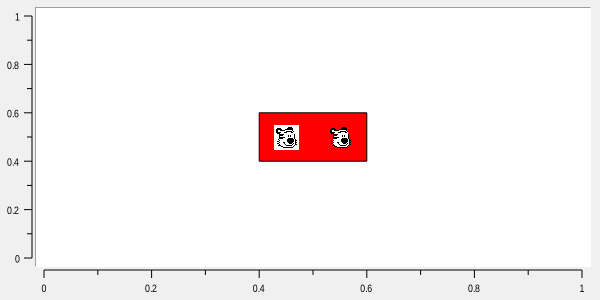
In addition to the common marker options, bitmap markers support:
Option |
Database name |
Database class |
Description |
|---|---|---|---|
|
|
|
Specifies how the bitmap is positioned relative to its reference coordinates. The default is |
|
— |
— |
Specifies the bitmap background color. This is a synonym for |
|
— |
— |
Synonym for |
|
|
|
Specifies the Tk bitmap to display. |
|
|
|
Specifies the bitmap background color. |
|
— |
— |
Specifies the bitmap foreground color. This is a synonym for |
|
— |
— |
Synonym for |
|
|
|
Specifies an optional bitmap mask. |
|
|
|
Specifies the bitmap foreground color. |
|
|
|
Specifies the rotation angle in degrees. The default is |
Image marker options
Image markers display a Tk image.
image create photo icon -file icon.png
.g marker create image -name iconMarker -coords {1 2} -image icon
In addition to the common marker options, image markers support:
Option |
Database name |
Database class |
Description |
|---|---|---|---|
|
|
|
Specifies how the image is positioned relative to its coordinate. The default is |
|
|
|
Specifies the Tk image to display. |
Line marker options
Line markers draw connected line segments through their X-Y coordinate pairs.
.g marker create line -name threshold -coords {-Inf 0.4 Inf 0.8} -outline red -linewidth 2
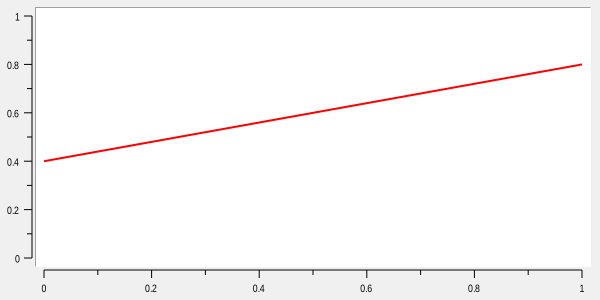
In addition to the common marker options, line markers support:
Option |
Database name |
Database class |
Description |
|---|---|---|---|
|
|
|
Specifies whether arrowheads are drawn at the ends of the line marker. |
|
|
|
Specifies the arrowhead geometry as three screen distances. |
|
|
|
Specifies the line cap style. Accepted styles are |
|
|
|
Specifies the dash pattern. An empty value selects a solid line. Each numeric list item accepts a Tcl integer expression. |
|
|
|
Specifies the offset into the dash pattern. The default is |
|
|
|
Specifies the color used for the off portions of a dashed line. An empty value uses ordinary on/off dashes. The default is empty. |
|
|
|
Specifies how adjacent segments are joined. Accepted styles are |
|
|
|
Specifies the line width. The default is |
|
|
|
Specifies the primary line color. The default is |
|
|
|
Specifies whether the line is drawn using XOR drawing. The default is |
Arrowheads
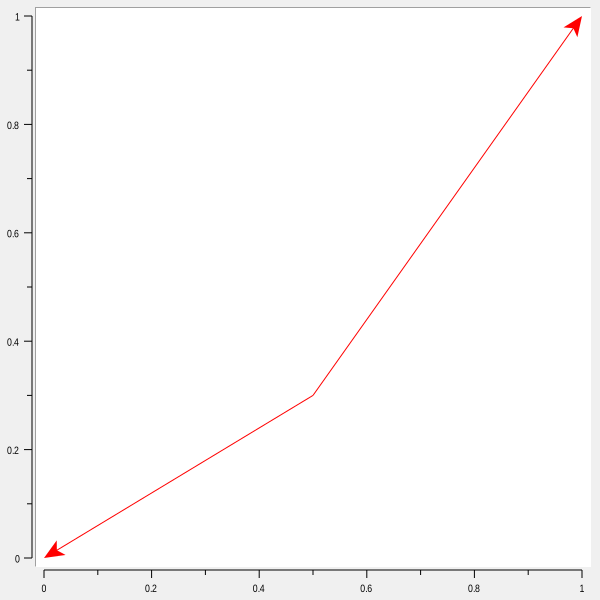
Line markers may draw an arrowhead at either end of the line by using the -arrow option. Accepted values
are none, first, last, and both.
For example:
.g marker create line -name direction -coords {0 0 0.5 0.3 1 1} -outline red -linewidth 1 -arrow last
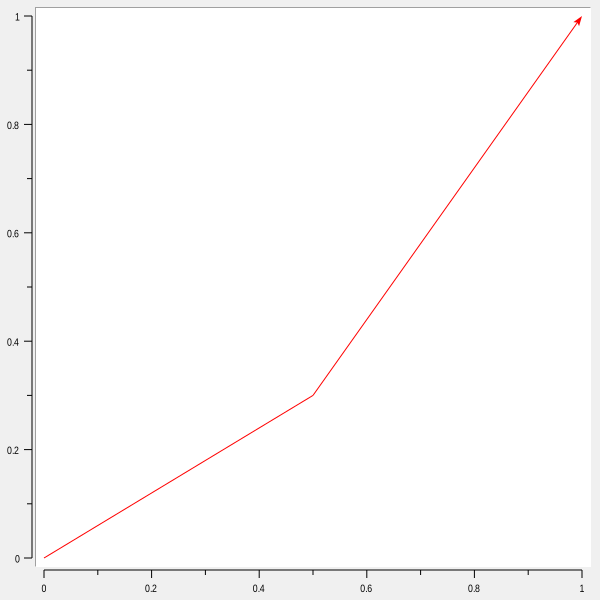
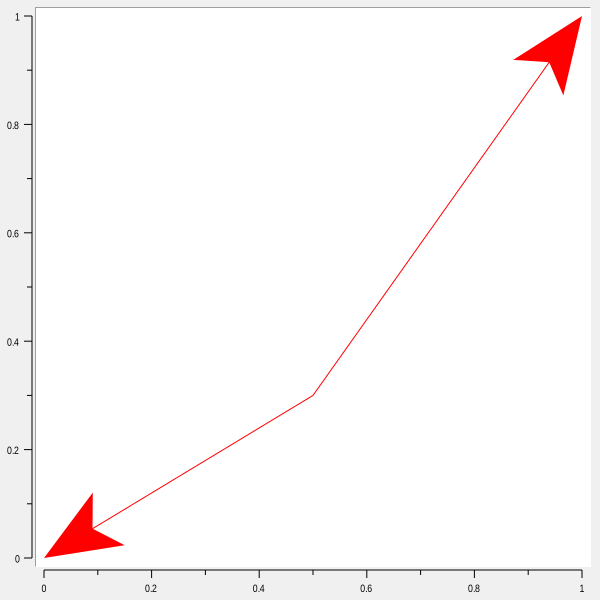
The arrowhead shape may be adjusted with -arrowshape. It accepts three screen distances {a b c}:
.g marker configure direction -arrow both -arrowshape {15 20 8}
a specifies the distance from the arrowhead neck to its tip, b specifies the distance from the trailing
points to the tip, and c specifies the distance from the outside edge of the line to the trailing points.
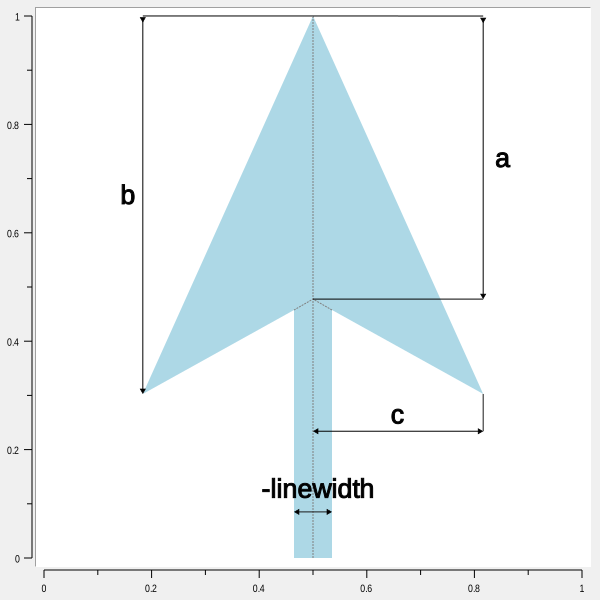
The arrowhead uses the line marker’s -outline color. The line shaft is shortened to the neck of the arrowhead
so that it does not protrude through the filled arrowhead.
Screen-distance units accepted by Tk may also be used:
.g marker configure direction -arrow both -arrowshape {1.5c 2.0c 0.8c}
Arc marker options
Arc markers draw circles, ellipses, open arcs, chords and pie sectors. -coords {x1 y1 x2 y2} specifies
two opposite corners of the bounding rectangle in graph coordinates. Either corner order is accepted;
an empty coordinate list hides the marker. The rectangle is mapped through -mapx and -mapy first,
then the ellipse is constructed in display coordinates. This keeps the shape elliptical on logarithmic
axes. Equal displayed width and height produce a circle; equal graph-coordinate spans need not do so.
Option |
Resource name |
Resource class |
Description |
|---|---|---|---|
|
|
|
Starting angle in degrees. Default: |
|
|
|
Signed sweep in degrees. Default: |
|
|
|
|
Zero degrees points right on the display. Positive sweeps run counterclockwise; negative sweeps run
clockwise. This display-angle convention also applies with descending or inverted axes. Angles must be
finite. Starts wrap modulo 360 for drawing; sweeps of magnitude 360 or greater draw one full ellipse. cget
retains the supplied angles. A zero sweep or zero displayed width/height draws nothing.
arcdraws only the curved outline and ignores filling, including stipple options.chordcloses the curve with a straight line between its endpoints.pieslicecloses the curve through the ellipse centre.
Full ellipses have no radial seam, regardless of style. Closed shapes can use -fill {} for an outline
only. -outline {} or -linewidth 0 suppresses the outline. The other appearance options have the same
meanings and defaults as polygon markers: -fill, -outline, -stipple, -linewidth, -dashes, -cap,
-join, and -xor. In particular, fill and outline accept foreground/background color pairs. Polygon markers
do not currently expose image fills or fill opacity, so arc markers do not add those options. Common marker
options, including offsets, visibility, drawing order and axis mapping, also apply. The default binding tags
are Arc all; the option database component class is ArcMarker.
Filled interiors and visible outlines participate in picking. Open arcs and unfilled closed shapes do not
select their empty interiors. Point picking uses the graph halo or half the outline width, whichever is
larger. marker find enclosed requires the complete mapped path inside the search box; overlapping checks
the clipped fill and outline centreline. Marker bindings and marker get current work as for other marker
types.
Cairo draws curved ellipse paths with the graph’s antialiasing setting. SVG exports elliptical arc commands;
PostScript exports transformed arc/arcn paths. These backends clip the original curve to the plot without
adding outline edges along the clip boundary. Line width and dash lengths remain in display units when the
ellipse is stretched, and stipple patterns retain their widget-space origin. Dashes follow the complete curve
continuously, including portions outside the plot. Full ellipses have a closed outline without a radial seam.
Native drawing (including XOR) and hit testing retain the flattened geometry, with a chord-error target of 0.15 display pixels and at most 8192 segments for extreme off-screen boxes. The native dash pattern may restart when a curve leaves and re-enters the plot. At extreme zoom, the hit-test approximation can differ from the curved path. Switching renderers does not change marker options.
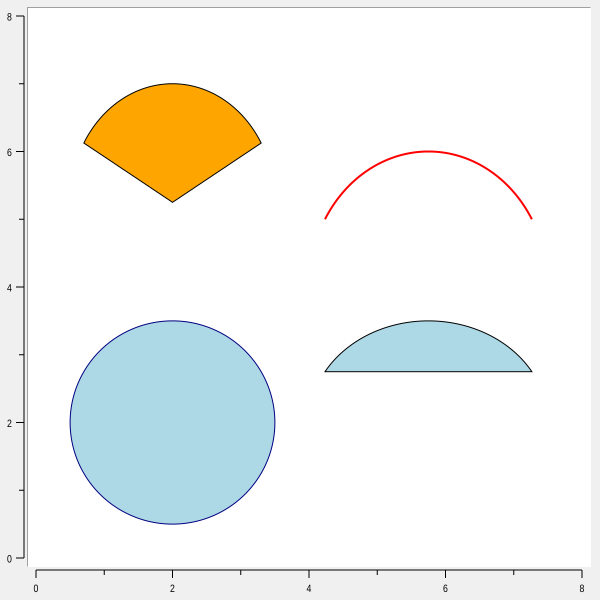
# Full ellipse
.g marker create arc -coords {0.5 0.5 3.5 3.5} -fill lightblue -outline navy
# Sector connected to the centre
.g marker create arc -coords {0.5 3.5 3.5 7.0} -start 30 -extent 120 -style pieslice -fill orange
# Segment closed directly between endpoints
.g marker create arc -coords {4 0.5 7.5 3.5} -start 30 -extent 120 -style chord -fill lightblue
# Open curve
.g marker create arc -coords {4 2 7.5 6} -start 30 -extent 120 -style arc -outline red -linewidth 2
Polygon marker options
Polygon markers draw the closed polygon formed by their coordinate pairs.
.g marker create polygon -name region -coords {0 0 3 0 3 0.5 1 1 1 2 3 2.5 3 3 0 3} -fill lightblue -outline navy
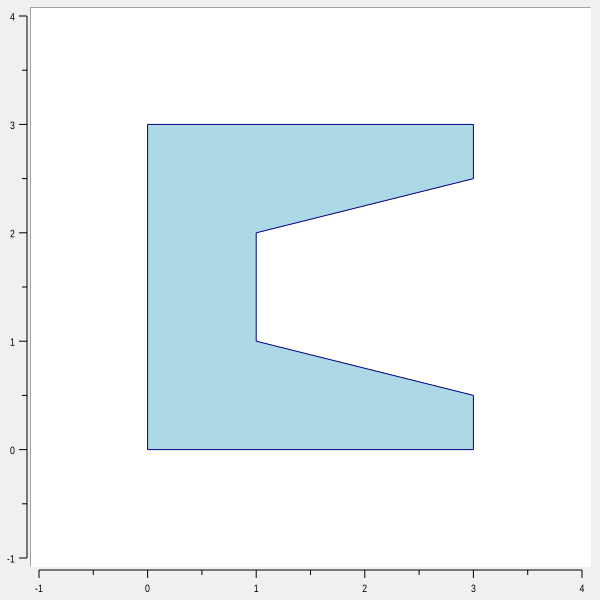
In addition to the common marker options, polygon markers support:
Option |
Database name |
Database class |
Description |
|---|---|---|---|
|
|
|
Specifies the outline cap style. Accepted styles are |
|
|
|
Specifies the dash pattern used for the polygon outline. An empty value selects a solid outline. Each numeric list item accepts a Tcl integer expression. |
|
|
|
Specifies the polygon fill colors. The value may contain one foreground color or a foreground and background color. With |
|
|
|
Specifies how adjacent outline segments are joined. Accepted styles are |
|
|
|
Specifies the width of the polygon outline. The value must be non-negative. The default is |
|
|
|
Specifies the polygon outline colors. The value may contain one foreground color or a foreground and background color. For dashed outlines, the second color is used for the off portions of the dash pattern. An empty value disables the outline color. The default foreground color is |
|
|
|
Specifies an optional stipple bitmap used when filling the polygon. An empty value selects an unstippled fill. |
|
|
|
Specifies whether the polygon outline uses XOR drawing. The default is |
Text marker options
Text markers display one or more lines of text.
.g marker create text -name annotation -coords {3 8} -text "maximum" -anchor s
In addition to the common marker options, text markers support:
Option |
Database name |
Database class |
Description |
|---|---|---|---|
|
|
|
Specifies how the text is positioned relative to its coordinate. The default is |
|
|
|
Specifies the text background color. This is a synonym for |
|
— |
— |
Synonym for |
|
— |
— |
Specifies the text background color. |
|
|
|
Specifies the font used to draw the text. |
|
|
|
Specifies the text color. This is a synonym for |
|
— |
— |
Synonym for |
|
|
|
Specifies justification of multiline text. The default is |
|
— |
— |
Specifies the text color. The default is |
|
|
|
Specifies horizontal padding around the text. The default is |
|
|
|
Specifies vertical padding around the text. The default is |
|
|
|
Specifies the text rotation angle in degrees. The default is |
|
|
|
Specifies the text shadow. |
|
|
|
Specifies the text to display. |
Window marker options
Window markers display a Tk window inside the graph.
The window must be a direct child of the graph and is geometry-managed by the marker. Its position follows the selected axes, anchor and offsets; its size comes from its requested size or the explicit marker dimensions. Zooming, resizing or inverting axes does not scale or rotate the child widget.
On redraw, the child is unmapped when the marker is hidden, has no coordinates, lies completely outside
its plot/track, or references a hidden element. It is mapped again when visible. Partial overlap keeps
the whole widget visible, including any portion extending beyond the plot/track into margins or other
tracks. Real child windows are not clipped or layered like painted markers; -under does not place a
live child behind graph drawing.
Track windows use -track name -mapy axisName, follow track resizing, reordering and inversion, and retain
the same child-parent and deletion rules as ordinary window markers. Deleting the marker destroys its
managed child. SVG/PDF capture the mapped child as a raster image, without an additional track clip;
they retain the existing window-capture controls and limitations.
button .g.info -text Info
.g marker create window -name infoMarker -coords {0.5 0.5} -window .g.info -width 2c -height 1c
In addition to the common marker options, window markers support:
Option |
Database name |
Database class |
Description |
|---|---|---|---|
|
|
|
Specifies how the window is positioned relative to its coordinate. The default is |
|
|
|
Specifies an explicit positive height for the embedded window. When left at its initial default of |
|
|
|
Specifies an explicit positive width for the embedded window. When left at its initial default of |
|
|
|
Specifies the Tk window managed by the marker. The window must be a direct child of the graph widget. An empty value removes the managed window. |
Option database
Marker options may be supplied through Tk’s option database. Each concrete marker type has its own resource class:
Marker type |
Resource class |
|---|---|
|
|
|
|
|
|
|
|
|
|
|
|
|
|
The resource name is the marker name.
For example:
option add *Graph.TextMarker.Foreground navy
option add *Graph.LineMarker.LineWidth 2
Copyright (c) George Yashin